

Content Creator Editorial Calendar Spreadsheet (Google Sheets & Excel)
Google Sheets + Microsoft Excel · Light & Dark Modes
Multi-Platform Content Planner, Sponsorship CRM, YouTube Production Hub & Repurposing Matrix
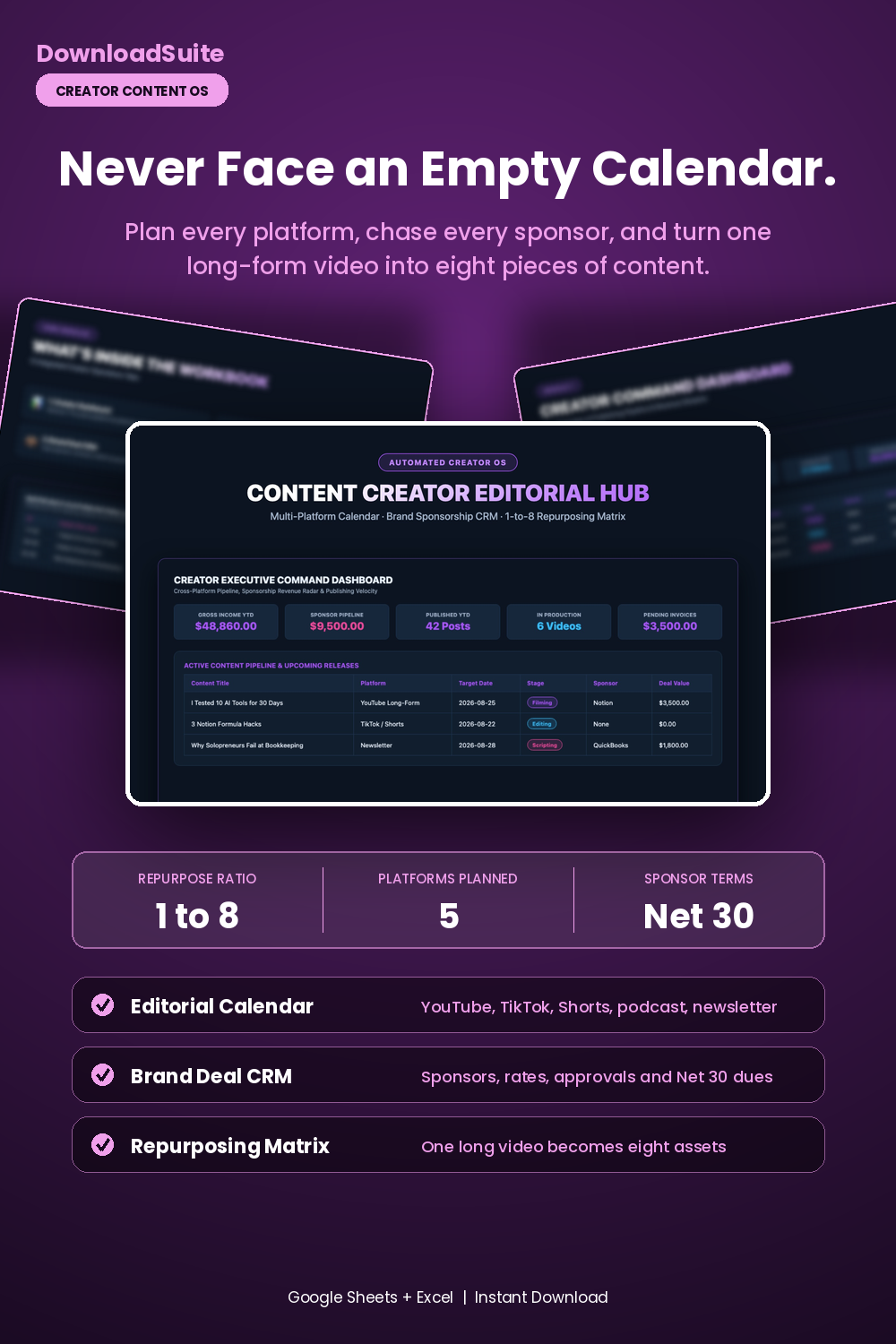
- Creator Command Dashboard (Live Gross Creator Income, Sponsor Pipeline & Production Counts)
- Master Multi-Platform Editorial Calendar (YouTube, TikTok, Shorts, Podcasts & Newsletters)
- Brand Deal & Sponsorship CRM (Track sponsors, contract rates, draft approvals & Net 30 dues)
- Multi-Stream Revenue Ledger (AdSense, sponsorships, affiliate commissions & tax set-asides)
- 1-to-8 Content Repurposing Matrix (Deconstruct 1 long-form video into 8+ derivative assets)
- Companion AI Prompt Pack Included (High-CTR packaging & sponsor negotiation scripts)
- Light & Dark Mode Included (Google Sheets + Microsoft Excel)
Instant digital download. All sales final. Message us anytime for help.
Take complete control of your content production, brand deal sponsorships, and multi-platform publishing schedule. The DownloadSuite Content Creator Editorial Hub & Multi-Platform Calendar is an automated business operating system engineered specifically for YouTubers, podcasters, newsletter writers, social media creators, and solo media founders.
Stop juggling scattered Notion docs, missed sponsor deadlines, and chaotic publishing schedules. This all-in-one Google Sheets and Excel system organizes your entire creative business — from planning cross-platform editorial calendars (YouTube, TikTok, Instagram Reels, Podcasts, Newsletters) to tracking brand sponsorship deal stages, calculating gross multi-stream creator revenue, and multiplying long-form videos into derivative short-form assets.
What's Included in This System:
- Creator Command Dashboard: High-contrast KPI cards for Gross Creator Income, Active Sponsorship Pipeline ($), Posts Published YTD, In-Production Active Count, and Pending Brand Invoices. Includes an interactive upcoming release schedule.
- Master Multi-Platform Editorial Calendar: Schedule publishing deadlines across YouTube, TikTok, Shorts, Podcasts, and Substack newsletters with automated due-date status flags.
- Brand Deal & Sponsorship CRM: Manage sponsor leads, contracted deliverable packages, draft approval due dates, payment terms (Net 30), and tracking links.
- Multi-Stream Revenue Ledger: Track AdSense, brand sponsorships, affiliate marketing commissions, and digital product sales with automated 25% tax set-aside calculations.
- 1-to-8 Content Repurposing Matrix: Deconstruct 1 long-form hero asset into 5 short-form clips, 1 newsletter issue, and 3 social posts to maximize publishing output.
- AI Prompt Guide Included: Complete companion prompt pack with 15 word-for-word prompt architectures for high-CTR YouTube packaging, 30-second retention hooks, 4-figure brand deal negotiation emails, and 1-to-8 repurposing workflows.
- Light & Dark Mode Included: High-contrast Dark Mode (Creator Violet & Neon Pink) for late-night editing plus clean minimalist Light Mode.
How to Use:
- Open the Google Sheets link or native Excel workbook and enter your active channels and rate cards in the Settings tab.
- Schedule upcoming videos and newsletters in the Editorial Calendar and track sponsor deliverables in the Brand CRM.
- Deconstruct hero videos in the Repurposing Matrix and track all AdSense, sponsorship, and digital product revenue in the Income Ledger.
What's inside
- Start Here Quick-Start & Creator Business Best Practices Guide
- Creator Executive Command Dashboard Tab
- Master Multi-Platform Editorial Calendar Sheet
- Brand Deal & Sponsorship CRM Pipeline Tab
- Creator Multi-Stream Revenue Ledger Sheet
- Content Multiplier & Repurposing Matrix Tab
- Companion Creator Scripting & Sponsorship AI Prompt Pack (AI_PROMPT_GUIDE.md)
- Instant Google Sheets Copy Links + Native Excel .xlsx Workbooks
FAQ
Can I customize the content platforms and channels?
Yes! You can add or rename channels (e.g., YouTube, TikTok, Threads, Substack, Patreon) in the Settings tab and all calendar channel labels will update automatically.
Does it calculate estimated taxes on creator revenue?
Yes! The Income Ledger includes an automated 25% estimated tax set-aside formula across all AdSense, sponsorship, and affiliate earnings.
Does it work in Excel and Google Sheets?
Yes! Both native Microsoft Excel (.xlsx) workbooks and instant Google Sheets copy links in Light and Dark themes are included.