

Rental Property ROI & BRRRR Calculator (Google Sheets & Excel)
Google Sheets + Microsoft Excel · Light & Dark Modes
Cap Rate, Cash-on-Cash Return, BRRRR Cash-Out Engine & 30-Year Wealth Projection
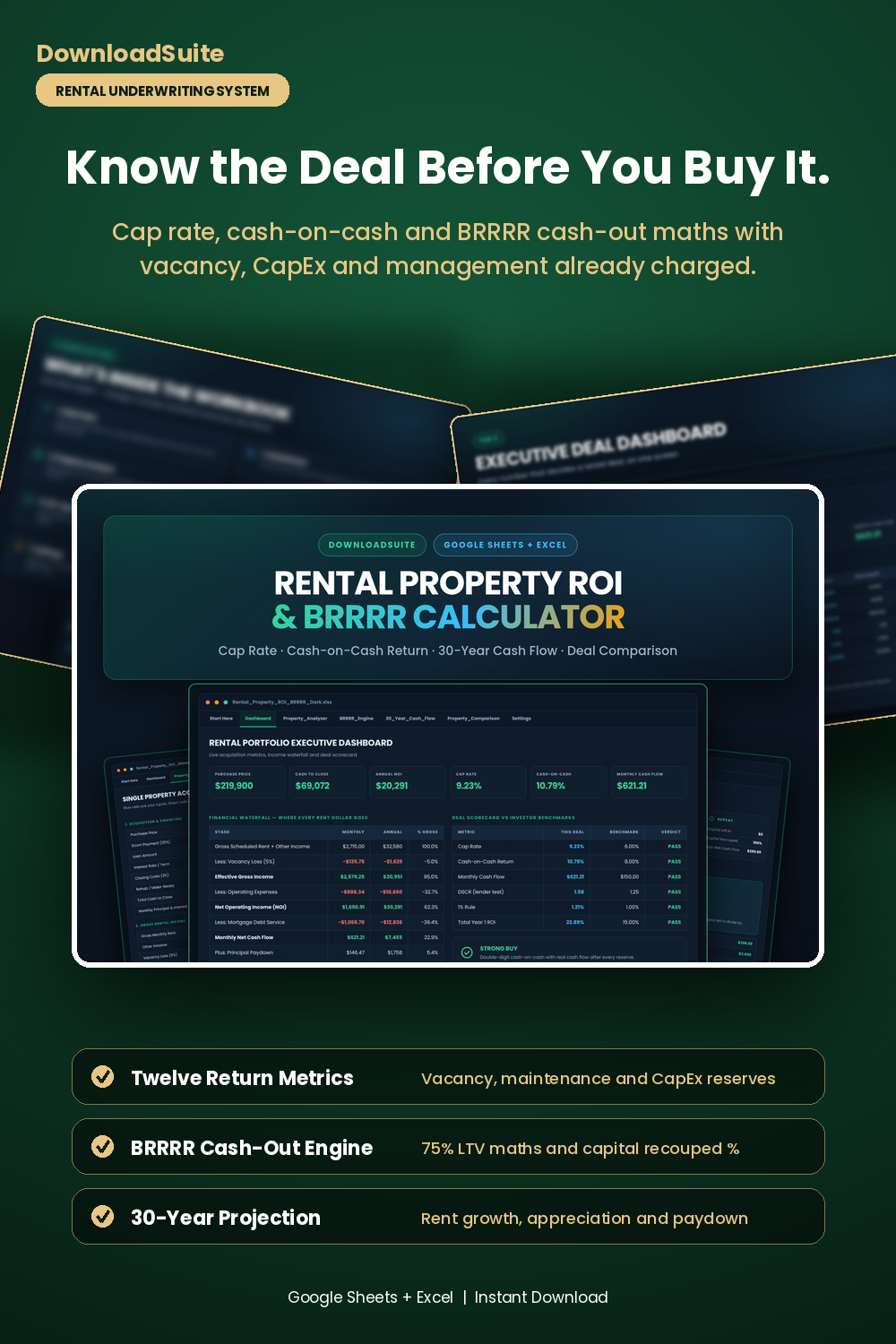
- Executive Dashboard (Cap rate, cash-on-cash, NOI, cash to close & full rent waterfall)
- Property Analyzer (Twelve return metrics with vacancy, management, maintenance & CapEx reserves charged)
- BRRRR Engine (75% LTV cash-out math, capital recouped % and infinite-return logic)
- 30-Year Cash Flow (2.5% rent growth, 3% appreciation, principal paydown & 27.5-year depreciation)
- Property Comparison (Underwrite up to 10 deals side by side with automatic verdicts)
- Deal Scorecard (Every metric marked PASS or REVIEW against investor benchmarks)
- Companion AI Prompt Pack Included (15 prompts for screening, BRRRR, tax strategy & scaling)
- Light & Dark Mode Included (Google Sheets + Microsoft Excel)
Instant digital download. All sales final. Message us anytime for help.
Stop guessing whether a rental deal actually works. The DownloadSuite Rental Property ROI & BRRRR Investment Calculator is a complete underwriting system for buy-and-hold investors, built in Google Sheets and Microsoft Excel. Type in a purchase price, a rent and an interest rate, and the workbook returns your cap rate, cash-on-cash return, monthly cash flow, DSCR and break-even occupancy immediately — with vacancy, management, maintenance and CapEx reserves already charged against the deal, the way a lender and an experienced investor look at it.
What's Included in This System:
- Executive Dashboard: Purchase price, total cash to close, annual NOI, cap rate, cash-on-cash return and monthly cash flow across the top, then a full financial waterfall showing where every rent dollar goes — gross rent, vacancy, effective gross income, operating expenses, NOI, debt service and net cash flow — plus a scorecard that marks each metric PASS or REVIEW against the standard investor benchmarks.
- Property Analyzer: Full acquisition underwriting. Purchase price, down payment, interest rate and term, closing and make-ready costs, gross rent and other income, a 5% vacancy allowance, property taxes, insurance, HOA dues, owner-paid utilities, 8% management, 5% maintenance and 5% CapEx reserves — ending in twelve return metrics and an automatic strong buy / buy / marginal / pass verdict.
- BRRRR Engine: Buy, Rehab, Rent, Refinance, Repeat modelled end to end. Initial capital invested, post-rehab ARV, the 75% LTV cash-out loan, cash returned at refinance, capital left in the deal, capital recouped percentage, post-refi cash flow, forced-appreciation equity, the 70% rule offer ceiling and explicit infinite-return logic that tells you the moment 100% of your capital is recycled.
- 30-Year Cash Flow: Long-term wealth projection with 2.5% rent growth, 2.5% expense inflation, 3% appreciation, a full amortisation schedule showing loan balance and principal paid each year, growing equity, and 27.5-year straight-line depreciation with an estimated annual tax shield.
- Property Comparison: Underwrite up to 10 prospective rental properties side by side with automatic cash flow, cap rate, cash-on-cash, 1% rule and buy / consider / pass verdicts, plus a shortlist summary.
- Settings: Every assumption in one place — vacancy, management, maintenance, CapEx, growth, appreciation, closing costs, depreciation term, tax rate and refinance LTV — along with financing presets, reserve benchmarks and the classic screening rules of thumb.
- AI Prompt Guide Included: 15 companion prompts covering deal screening, NOI stress-testing, rent comp validation, rehab ROI prioritisation, hard money cost comparison, appraisal defence, cost segregation, 1031 exchanges and portfolio scaling.
- Light & Dark Mode Included: High-contrast dark theme for late-night deal analysis plus a clean light theme that prints well.
How to Use:
- Open the Property Analyzer and enter your purchase price, down payment, rate, rent, taxes and insurance in the blue input cells.
- Read your cap rate, cash-on-cash return, monthly cash flow and DSCR — reserves are already charged, so the numbers hold up.
- Running a value-add deal? Move to the BRRRR Engine, enter your rehab scope and ARV, and see exactly how much of your capital comes back at the refinance.
- Drop your shortlist into the Property Comparison tab and let the verdict column pick the deal.
Companion Spreadsheet:
Already own the property? Pair this with our Rental Property & Landlord Income Spreadsheet for ongoing rent roll, tenant lease and Schedule E expense tracking.
What's inside
- Start Here Quick-Start Guide & Cap Rate / Cash-on-Cash Explainer
- Rental Portfolio Executive Dashboard Tab
- Property Analyzer Acquisition Underwriting Sheet
- BRRRR Engine (Buy, Rehab, Rent, Refinance, Repeat) Tab
- 30-Year Cash Flow & Wealth Projection Sheet
- Property Comparison Matrix (Up to 10 Properties)
- Settings: Assumptions, Financing Presets & Reserve Benchmarks
- Companion Rental & BRRRR AI Prompt Pack (AI_PROMPT_GUIDE.md)
- Native Excel .xlsx Workbooks in Dark and Light Themes
FAQ
What is the difference between cap rate and cash-on-cash return?
Cap rate is annual net operating income divided by the purchase price — an unlevered yield that ignores your mortgage. Cash-on-cash is annual cash flow divided by the cash you actually invested, so it reflects your financing. The workbook calculates both, plus DSCR and total year-one ROI.
Does the BRRRR calculator handle the cash-out refinance and infinite return?
Yes. Enter your as-is price, rehab scope, holding costs and post-rehab ARV, and the BRRRR Engine calculates the 75% LTV cash-out loan, cash returned at refinance, capital left in the deal and capital recouped percentage — and states outright when 100% of your capital has been recycled.
Are vacancy, management and CapEx reserves included in the cash flow?
Yes, and that is deliberate. A 5% vacancy allowance, 8% management fee, 5% maintenance and 5% CapEx reserve are charged before cash flow is calculated — management even if you self-manage — so your numbers still hold the day you hand the property to a manager. Every rate is adjustable in Settings.
Does it work in Excel and Google Sheets?
Yes. Native Microsoft Excel (.xlsx) workbooks are included in both Dark and Light themes, and they import cleanly into Google Sheets. Everything is a native formula — no macros, no add-ons and nothing to install.